For those of you who have not purchased My Digital Studio yet but are thinking about it, I have created a new category of blog posts called "Using Original MDS". If you click on that category you will see only layouts used with what comes in the My Digital Studio software. I tend to make layouts using the additional downloadable content you can purchase, and if you'd rather just see the core line, these projects are great for that.
Speaking of buying MDS, now's the perfect time to purchase, as you will get a free Sale-A-Bration item for spending over $50! But hurry, the offer ends March 31.

Showing posts with label Using Original MDS. Show all posts
Showing posts with label Using Original MDS. Show all posts
Thursday, March 17, 2011


Wednesday, March 2, 2011
Templates, templates, templates!
I have been on a digital scrapbooking roll lately. I have so many photos, though, that I want to get scrapbooked of 2008-2010 that sometimes I don't want to spend an hour making a super cute layout from scratch. That's when the My Digital Studio designer templates come in handy. All the templates shown below come with the software! Sometimes I moved or changed one or two things, but mostly I kept them how they originally came. At this rate, I might be filling my albums quicker than I thought!


Saturday, February 26, 2011
I love to CASE!
CASE = Copy And Share Everything
I really love Heather Summers' digital layouts. They are simple, bold, and she seems to whip them out in no time! So I love case'ing her. This page she made uses the Nursery Necessities stamp set which is perfect if you have lots of baby photos to scrapbook.
Here's her page:


Don't forget to enter my giveaway! You could win 2 custom digital scrapbook pages created by me!
I really love Heather Summers' digital layouts. They are simple, bold, and she seems to whip them out in no time! So I love case'ing her. This page she made uses the Nursery Necessities stamp set which is perfect if you have lots of baby photos to scrapbook.
Here's her page:

I love how she used the colors from her photos to inspire her color selection and I loved the stamped stars and borders on the left side of the page.
One of the best features of My Digital Studio is the color picker- you can match your colors to the colors in your photos! I loved using this feature on these pictures of my daughter playing in her exersaucer. I used toys on her exersaucer to pull the color for the orange to fill the stars.

Tuesday, February 1, 2011
Scrapbooking? Easy as Pie with MDS!
So I pretty much live for easy. I have a 7-month-old baby and a house that is always needing attention. Not to mention two step-kids and a million photos of our family doing things I want to scrapbook. I love that My Digital Studio has pre-made templates that I can just throw my photos into or tweak a little to fit my photos. In this layout, I simply moved all of the objects to the left side of the page to make room for my vertical photo and changed the background paper to be a red that more closely matched the girls' dresses. I love the result!


Let me know if you are interested in purchasing My Digital Studio!
The original template:

After my changes:

Let me know if you are interested in purchasing My Digital Studio!
Monday, January 31, 2011
Using sketches to digitally scrapbook
Another demonstrator, Alesha Walls, does a weekly sketch challenge over at the My Digital Studio community. I've been wanting to participate and this week's sketch was a perfect place for me to start. I love that I don't have to put any thought into what my design is going to be. I just pick the colors and stamps that match my photos.


Go here to see other layouts made using the sketch.
I also made the following layout using a sketch I found here. I use all the help I can get to make scrapbooking quicker and easier!

Here is the sketch:

And here's my layout:

Go here to see other layouts made using the sketch.
I also made the following layout using a sketch I found here. I use all the help I can get to make scrapbooking quicker and easier!

Tuesday, January 25, 2011

Monday, January 24, 2011
Quick Baby Cards with MDS
So I've been needing to make some baby cards for a while now (seems like our friends and family keep popping them out ;) so today I decided I would sit down and do it. I really didn't want to get out my stamps and make a mess so I thought I'd give it a try in My Digital Studio.
I designed a very simple card using colors for a baby boy:

I purposely kept the card gender neutral in its design so that all I'd need to do is change out the colors.
Here's the baby girl card:

My Digital Studio does have a great printing service with reasonable prices, but since I needed the cards today, I lined them up on the right side of a Photoshop document and printed them on best quality on white card stock at home. They turned out great!

I designed a very simple card using colors for a baby boy:

I purposely kept the card gender neutral in its design so that all I'd need to do is change out the colors.
Here's the baby girl card:

My Digital Studio does have a great printing service with reasonable prices, but since I needed the cards today, I lined them up on the right side of a Photoshop document and printed them on best quality on white card stock at home. They turned out great!

The nice thing about these cards is they are flat so I can mail them and not have to worry about having to pay extra postage. If I were giving them at a shower or something I could add real buttons and staples, though, to give it more of a three-dimensional quality.
I really do love how quickly I made these cards! Leaves more time in the day to play with my baby girl. :)
Wednesday, January 5, 2011
Sunny Days layout (MDS)

Yesterday I was freezing so I decided to work on a layout from summertime to warm me up. This was the first time Esper wore a bathing suit - isn't it TO DIE FOR cute? I think so. I played around with a lot of colors but in the end I went for simple so the focus could be on the photographs. I like the result!
Monday, January 3, 2011
Cherish Christmas card (My Digital Studio)

My sister wanted a Christmas card designed to go along with these photos and she didn't necessarily want a Christmas theme to the card. I love that in My Digital Studio I can pick the colors I want to use based on the colors in the photos. And I found a perfect stamp set to use that adds elegance to the photos of her and her family. She really loved how it turned out, and that made me very happy! I would love to design something for you too if you ever need it!
Thursday, November 18, 2010
Peace Love Joy card (My Digital Studio)
Here is the card that I designed for the contest. It was actually the first card I created in My Digital Studio. It was so easy and fun- I can't wait to make more!


Tuesday, November 16, 2010
Happy Halloween layout (My Digital Studio)
So I was all set to enter Stampin' Up!'s My Digital Studio contest when I read the official rules and realized that I couldn't. I have family members that work there and should have realized that would mean I couldn't enter. So I was a little sad, but hey that means I get to show you the pages I would have entered into the contest! Here is the first layout I did:
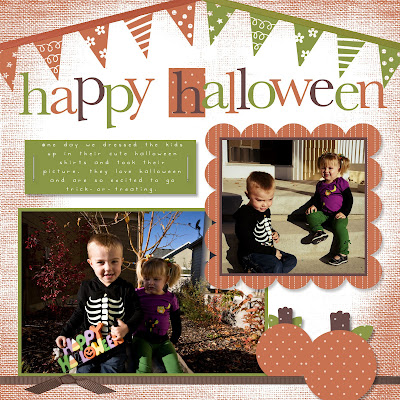
To create the banners at the top, I simply used the party hats stamp, turned them upside down, and used white circle punches to cover up the pom-poms at the top of each hat.
Come back tomorrow and the next day to see my other page + card that would have been my contest entry.

To create the banners at the top, I simply used the party hats stamp, turned them upside down, and used white circle punches to cover up the pom-poms at the top of each hat.
Come back tomorrow and the next day to see my other page + card that would have been my contest entry.
Monday, November 8, 2010
Scraplifting in MDS
I saw a great paper layout last week on the cover of Scrapbook & Cards Today and I knew just what pictures I wanted to use with the design.


To recreate the pumpkin, I simply used the oval punch matted and layered. I love creating my own embellishments in My Digital Studio, especially when you can't find the exact stamp for what you want.
To find out more info about My Digital Studio, leave me a comment.


To find out more info about My Digital Studio, leave me a comment.
Tuesday, October 12, 2010
E layout (My Digital Studio) & SU Digital Contest

So Stampin' Up! is doing a My Digital Studio contest! (And you don't have to be a demonstrator to enter.) Here are the details:
Date: October 1-November 15, 2010
Stampin' Up! invites YOU to participate in its first ever digital design contest using My Digital Studio and Stampin' Up!'s digital downloads! The My Digital Studio Design contest was created to recognize the amazing digital design skills of our talented, creative customers and demonstrators! The contest is open to all customers and demonstrators who have access to My Digital Studio in the US and Canada; five customers and five demonstrators will be selected to win. To enter the contest you will need to design one digital card and two single-page layouts using ONLY My Digital Studio product and Stampin' Up downloads. Submit all samples along with an official entry form and photo release form (if applicable) to MDSContest@stampinup.com.
Winners will receive free My Digital Studio digital downloads from Stampin' Up valued at approximately $400! You will also receive a digital pin for your personal blog.
Don't own My Digital Studio or want to purchase new Stampin' Up! digital downloads? Click here!
Our panel of judges can't wait to see your digital artistry on display, so submit your project today!
Ready, Set, Create!
- Read the complete official rules.
- Read the My Digital Studio Designing contest FAQ's.
- Download an official entry form and photo release (if applicable).
Sunday, September 26, 2010
Happy Holidays 2009 (My Digital Studio)
I had a great time in St. George! The baby did great, and we did a lot of fun stamping and swapping. I saw some great digital layouts there so I had to come home and get back to making more. Here's one I just made tonight with pictures from last Christmas. Anyone else starting to get in the Christmas mood? I guess it's having a baby for the first time this holiday season that I'm so excited about!

Let me know if you'd like more information about purchasing My Digital Studio, or learning how to use it.

Let me know if you'd like more information about purchasing My Digital Studio, or learning how to use it.
Friday, September 3, 2010
My Digital Studio layout - Cherish Life
I think this is my favorite layout I've made using My Digital Studio so far. I love it. :) (Photos by Amanda Nelson Photography & Design.)


Thursday, September 2, 2010
Quick & Easy with My Digital Studio
Sometimes I feel like being creative and starting from scratch with an idea. Other times, I just want to be able to add layouts to our family album quickly and call it done. My Digital Studio lets you do both! On this day, I simply opened up these two already made layouts and added pictures and a date. Honestly, it took maybe five minutes! These are both part of a whole set of premade layouts you can use to make a theme album of an event. I simply opened the pages individually and decided to use them that way. If you are interested in taking a class to learn how to use My Digital Studio, send me an email or leave me a comment.


Tuesday, August 31, 2010
My Digital Studio: My 1st Attempt
So I wasn't sure if I would like My Digital Studio or not, but once I tried it, I couldn't believe how easy it was! I mostly use Photoshop for my digital scrapbooking, and I didn't think it would have all the features I needed. Well I was wrong! I love that you can change the color of every item, add mats, and drop shadows. Once I started using it, I got addicted and will be making many more scrapbook pages (probably while the baby naps since it's so quick and easy). You may also notice that I used My Digital Studio to decorate my blog. It's so easy! If you are interested in taking a class to learn how to use My Digital Studio, or information about how to purchase it, leave a comment or send me an email.


Subscribe to:
Posts (Atom)
